Category: Devlog

  • Between Horizons Post-Mortem: The Curse Of The Second Game

    Between Horizons Post-Mortem: The Curse Of The Second Game

    Hi! This is Julian, CEO of German indie game studio DigiTales Interactive. We’ve created two sci-fi detective adventures for PC and consoles: Lacuna (2021) and Between Horizons (2024). In this post, I’m reflecting on the development, release and reception of the latter, while touching on a host of larger topics surrounding game development and this industry I’ve been a part of for over a decade now.

    It is a lengthy read, and it took me two full days to write. It’s an honest attempt to pass on all my learnings from about four years of production, and to caution you about all the mistakes I’ve graciously made so you don’t have to.

    I hope you’ll find it useful or at least interesting. If you have your own thoughts on the matter, be it objections, questions, additions, or corrections, please don’t hesitate to reach out to me and/or share them wherever you are reading this. Without further ado, here it comes. I’ve dug up many outdated meme templates to help you get through it!

    Part 1: Suffering from success

    I’ve often heard people say that the beginning is the most difficult part. When you have no idea what you’re doing yet, and the task ahead is a vast, uncharted mountain range that disappears into the clouds – that’s what your first big game project feels like. The majority of people don’t see it through, and even most of those who do never make a second game. This comes as no surprise as statistically, your game will crash and burn commercially.

    Now, picture this: Your very first game gets signed by a publisher. You manage to secure a 6-figure amount in funding. You finish production in time, and it’s a success beyond any reasonable expectation. You go on to sell 300.000+ copies across platforms, win awards, and receive accolades from players and journalists across the globe. You’ve made it, right? Things only get better from here, right?

    This happened to us with Lacuna. Then came our second game Between Horizons. All told, its production was far from a disaster compared to many industry horror stories. We did manage to finish it without severe burnout, and it turned out pretty good. However, despite having learned so much from our first game, we ended up finding a plethora of new mistakes to make. To an extent, I now believe that being in a comfortable position for a while, having secured funding for a few years worth of development, made us a little complacent. Not in the sense that we were ever lazy, but that we took too much time for irrelevant things while our budget was slowly melting away. To expand on the mountain climbing metaphor, we were obsessed with security on our first ascent, only to forget clipping in our carabiners on the second.

    Ultimately, Between Horizons took more time and money to make than I had estimated, and I’m about to lay out extensively why I think that was – but even if it hadn’t, its commercial prospects were never looking great. Public reception was lukewarm from the beginning. Even though our publisher submitted the game to many festivals, awards, store events etc., it wasn’t wooing people the way we had hoped. This trend continued after it came out: The game did launch with more Steam wishlists than Lacuna had due to a longer pre-release period, but conversions were slow to come in. It doesn’t take an expert to deduce, just based on publicly available data, that Between Horizons likely hasn’t made its money back yet. As of September 2025, it sits at just over 400 Steam reviews, which does not measure up to the (relatively modest) production budget of a game this size.

    That being said, if it had been our first release, I would feel differently about it. Tens of thousands of people have played Between Horizons, and 91% of Steam reviews are positive – that’s still something to be proud of, and it puts the game above the vast majority of releases on the platform. However, a year and a half after its release, it is lagging behind Lacuna by a wide margin. Why is that? Are we just a one-hit wonder? Did we peak at our first release, doomed to forever chase that high?

    Fortunately, I don’t think that’s the case. Let’s dive into the much more complicated truth.

    Part 2: Growth for growth’s sake

    Some of the takeaways in parts 2 and especially 3 are very subjective and will only apply to certain situations and personalities. If you’re an allrounder like myself working alone or in a small team, I might be able to caution you about some potentially costly mistakes. If you aren’t, there are still many general considerations in there for you, such as finding the right game to make next.

    Play it safe

    Success is when the numbers go up, right? If your first game made its money back and then some, capitalist logic dictates that it’s time to expand. The next one will be more ambitious in every way, requiring a bigger team and budget. With the bigger investment comes a bigger game, comes a bigger audience, comes a bigger return on investment. Money printer go brrrr!

    Not at all. Do not fall for this trap.

    Don’t fix it if it ain’t broken. Do not grow the team, do not expand the scope of your project, do not increase the budget, unless you have a banger of an idea that absolutely requires you to. If your first game was successful, your learning should be “keep going”, and not “change it up”. Even though we somewhat stayed the course by making another narrative sci-fi detective game, and the changes to the formula were well thought-out based on decent game design ideas, the required expansion of the budget killed any chance of breaking even in an acceptable timeframe. Know your niche, and be realistic about the return of investment you can expect.

    Success comes in many different forms. If you run a 3- or 4-person studio that can comfortably exist for decades without a major hit, I would call that an incredible feat. It would make me very happy, and in hindsight I don’t know why I didn’t aim for that in the first place. In my mind, success meant we had to grow, which it simply does not.

    Don’t play it too safe

    All that being said, I have another piece of advice. Do not make a sequel either. This is admittedly not something we learned first-hand, as we decided against it early-on. I want to explain the reasoning behind this, since you might have been yelling “IF YOUR FIRST GAME WAS SO COOL, WHY DIDN’T YOU MORONS MAKE A SEQUEL THEN” at the screen for a while now.

    At least looking at anecdotal evidence, the sequels created by our fellow indies always seem to perform worse, often far worse, than the first game of the series. I doubt that this is because sequels are consistently just worse games. Imagine this: You’re browsing Steam and see that Awesome Game 2: Return Of The Awesome just released. It’s 10% off for the first week, but the first Awesome Game is 75% off in the same period for a nice little synergy effect. You click that one because you haven’t played it either yet, and maybe it makes more sense to start the series in the beginning. Perhaps you decide to buy Awesome Game 1, or perhaps you realize that it’s been sitting in your library for two years already, completely untouched. You put Awesome Game 2 on your wishlist and decide to wait for it to be more steeply discounted. After all, you haven’t even gotten around to Awesome Game 1 yet. A year later, you get a notification that Awesome Game 2 is now 50% off. You still haven’t touched Awesome Game 1, or maybe you have, but you never finished it even though you liked it alright. As soon as you finish it, you will surely buy Awesome Game 2… (None of that will happen.)

    That’s just a story, but maybe it sounds relatable to my fellow adult gamers out there. If someone has data specifically on sequels that backs up or refutes my thinking here, please hit me up! I’m happy to amend this paragraph.

    Here’s how to play it, maybe

    Looking back, I believe we should have stuck closer to Lacuna with our second title. After all, we had only just gotten the hang of it. Changing the art style (adding a 3rd dimension no less), and making the gameplay formula much more open-world were unnecessarily drastic changes that threw us into deep ends we didn’t even need to be in. Iterating more slowly and maybe even narrowing the scope, really getting to the core of what makes the detective genre fun, would likely have been the better approach. (I can neither confirm nor deny that this is what we’re doing with our third game.)

    That being said, many studios completely change up the genre from one game to another. There can be good reasons for this, but they need to be reality-checked. The same goes for upping the scope and budget, which I cautioned earlier to only do if your banger idea justifies it. I urge you to test your new idea in every way possible, as early as possible, before you start throwing money at it. Do not start by hiring new people to realize the idea; develop an MVP with your tiny team and show it to your intended audience. There is no other way to find out if it is indeed a banger and worth expanding or switching genres for.

    In fact, I’ll go one step further: The new meta might just be to throw a lot of concepts at the wall – the wall being Steam – and see what sticks. Put together a concept for a small game with a clear focus, set up a store page, and create some buzz with as little time investment as possible to gauge interest. Set up kill gates (obtain x wishlists in y months) and consistently scrap projects that don’t make it across. If something has legs, make an actual game off the bullshots. I’m personally (at this point in time) too idealistic and too passionate about certain ideas, but this seems like a commercially sound strategy compared to what most of us indies do – flying blind for years in the hopes that someone will care once we get there. Maybe if more of us tested ideas early this way, the majority of indie games wouldn’t be years-long sunken cost fallacies.

    Part 3: Focus on your strengths

    I’ve made it clear that wasting money on tasks, services, features, and ultimately time that we did not actually need was a major mistake on my part. However, there is another hidden cost to it, which might be the most detrimental to both the project’s final quality and the pace of its production: While I was a major creative force on Lacuna from beginning to end, directly working on literally all aspects of the game, I spent more than half my time on Between Horizons with management. This is not to say management is terrible or unnecessary, but it has two severe downsides.

    Don’t hand off your baby

    First, I effectively left much more of the creative work to others. Although many people made fantastic contributions to Lacuna, it was in large part my brainchild, and people liked the creative work that I had personally put into it. My co-founder and I wrote the entire story and in-game texts, co-designed all of the cases, put together all the levels, and implemented the entire story logic. On top of that, I composed the entire soundtrack safe for two guest tracks. With Between Horizons meanwhile, I handed off much more of the creative work to others.

    It may be obvious to most readers, but it bears repeating that productivity does not scale linearly with the amount of people. If one person can make a game in a year, then twelve people can make that same game in a month, right? Every employee adds an overhead of communication and bureaucracy. Think hard before putting all the time and energy of (presumably) your most productive worker – yourself – into maintaining this structure, especially when you have already proven to do good work in other areas that would receive less of your attention.

    My decision to voluntarily maneuver myself into more of a management role is another one I do not understand in hindsight, and not just from an efficiency standpoint. Spreadsheets, sprints, and effort points aren’t not fun, but they’re certainly not why I got into game development – the creative part is.

    Don’t surrender control

    Second, I lost all control over certain aspects such as the code base and the 3D art workflow, neither of which I had the time to learn much about. This didn’t just make me feel uneasy, it had severe ripple effects that frequently slowed down the project. Whenever there was a technical issue in the project preventing me from doing my work – which happened a lot –, I had to ask a programmer for help. Sometimes this would mean calling them over, interrupting their current work and ultimately losing a lot of time to task-switching. To prevent this, I’d often opt for creating elaborate tickets instead, with all the steps to reproduce the issue and some captured footage to go along with it. Waiting until someone got around to the ticket would in turn often take multiple hours or sometimes even days. As a self-employed person, I have no qualms working into the night, on weekends, and holidays, but I’ve never expected this from anyone else. I would oftentimes open up Unity on a Saturday, a fresh cup of coffee in hand, not having to worry about emails or other nonsense interrupting my work – only to quickly realize that the project was not in a state for me to do any of it.

    With Lacuna, even though I wasn’t the main coder, I was always knowlegeable enough to look into such issues myself. Some stretches of the Between Horizons production would have progressed much faster if I hadn’t completely surrendered control of the code base. Making it worse is the fact that now, after the programmers in charge left the company, it’s incredibly difficult to address bugs or make other improvements to the game. This is especially true for the Xbox and PS5 ports, neither of which the remaining team had much involvement in.

    Don’t build what you don’t need

    I know what some of you are thinking: “You don’t have to do it all yourself. Just give better directions. And for the love of god, restrict people from pushing to the production branch on a Friday afternoon when there is no system for pull requests or automated tests.” We did spend a lot of time establishing, documenting, and enforcing rules and systems for our work and communication at the pre-production stage. We threw half of them out the window as the overhead was just not worth it for a team our size. I get that I can’t have it both ways: Playing it fast and loose so the game actually gets done, and then complaining that it’s not always in a playable state. This is a tough line to walk, and reasonable people will often disagree in this technical area. When is a shortcut worth taking? How modular and extendable will this bit of code really need to be later-on? At what point is it no longer a time-saver to develop this tool further? And so forth.

    It just so happened that I often listened to people who were more well-versed in programming than me. In hindsight, I should have stood my ground because I was the one with knowledge of the budget and timeline, and with a decade of experience under my belt, programming degree or not. It was my responsibility to balance the goals of my team members and decide when something was good. After all, to a hammer, everything looks like a nail. An artist will try to make the game as pretty as can be, a game designer will want to make it the most fun, and a programmer will want it to have the best code base. And while all of them need to manage their expectations, I feel the need to point out that great art direction and game design have won countless awards, while clean code has not. If your game can be held together by some duct tape and a prayer, it arguably should be.

    Of course, our games are simple; they won’t grow out of control, and we won’t need to accommodate complex, possibly yet unknown features down the line. A quick and dirty approach often would have worked, down to the very foundation of the game. It did in Lacuna, which wasn’t much simpler than Between Horizons, and – here’s the kicker – broke a lot less frequently throughout the production phase. When it did, fixes were quick and simple.

    My experience at times has been that somebody given a task will often take exactly however long you give them for it. The extra time is spent on making it nicer, cleaner, or more elaborate, not necessarily better in way that’s worth it or sometimes even tangible. This is especially true for programming tasks; a system being more elaborate does not always make it safer, more future-proof or less prone to breaking – it does, however, often make it harder to understand, maintain, and fix later, especially by someone who didn’t write it. I should have followed my gut more often and made executive decisions sooner when things were taking too long, or when we were working on something irrelevant to the player experience (which was usually my own, incorrect call to begin with).
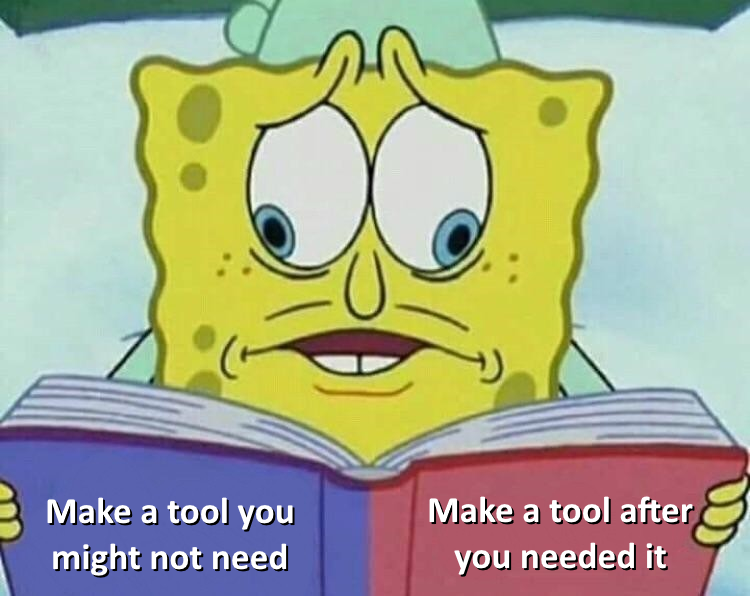
    To expand on this last point: Never, ever make a feature or tool because you think you might need it later. Did you know, for example, that NPCs in Between Horizons can not only call, but use elevators? And that they can enter them together, stepping out of each other’s way, and exit them at different stops, all integrated with our pathfinding system? If you’ve played the game, you may be correctly remembering right now that NOT A SINGLE NPC EVER EVEN USES AN ELEVATOR. This was another moronic waste of resources on my part that I stopped way too late.

    Part 4: Everything else that went wrong

    So far, I’ve been focussing on strategic failures that hindered the production process. While they did make it harder to break even by increasing the project’s development time and budget, they didn’t necessarily set it up for commercial failure. Some competitors in the detective genre, including our own first game, have proven the niche to be way bigger than the audience Between Horizons is reaching. So why aren’t they buying it?

    The product

    Regardless of your personal opinion on some mainstream titles, we can all agree that a terrible game will never sell well. But a terrible game does not score 91% on Steam and 83 on Metacritic. A masterpiece would’ve certainly sold better, but Between Horizons’ main issue isn’t quality – it’s marketability. Unlike the marketing itself, which fell on our publisher, this aspect was in our hands alone, and we failed big time in my opinion.

    When you’re coming up with a game idea and subsequently go about its realization, you should keep marketability in mind at all times. By this I do not mean “include a completely unnecessary cute character so you can sell plushies to children later”. I mean “create a product that will be able to immediately communicate the experience players will get”. Our first title Lacuna had an on-the-nose noir setting with a brooding, smoking, trenchcoat-wearing main character that we plastered all over the game’s key artworks and trailers. Mood, setting, and protagonist being recognizably taken from detective stories created an expectation that there might be detective gameplay. We did mess up the title – because what does “Lacuna” even mean? –, so we added the subtitle “A Sci-Fi Noir Adventure”. Games that did a way better job on this include “Case Of The Golden Idol” (there’s a case, so you’re a detective) and, maybe the best example, “Duck Detective” (you’re a duck who is a detective, duh).

    I used to think that all those long isekai manga titles were silly, now I think they’re brilliant. It’s true that nobody reads past the title anymore, so you might as well put the whole premise in it. Maybe it’s just a matter of time until games like “Help! My girlfriend turned into a fridge, and now we have to battle through a grocery store dungeon together” start blazing a trail on storefronts across all platforms. Half-jokes aside, “Between Horizons” is a similarly awful title to our first. At least it vaguely suggests sci-fi – but then we made the crucial mistake of commissioning a redundant key artwork that does the same. Here’s how I imagine people saw the artwork for the first time:
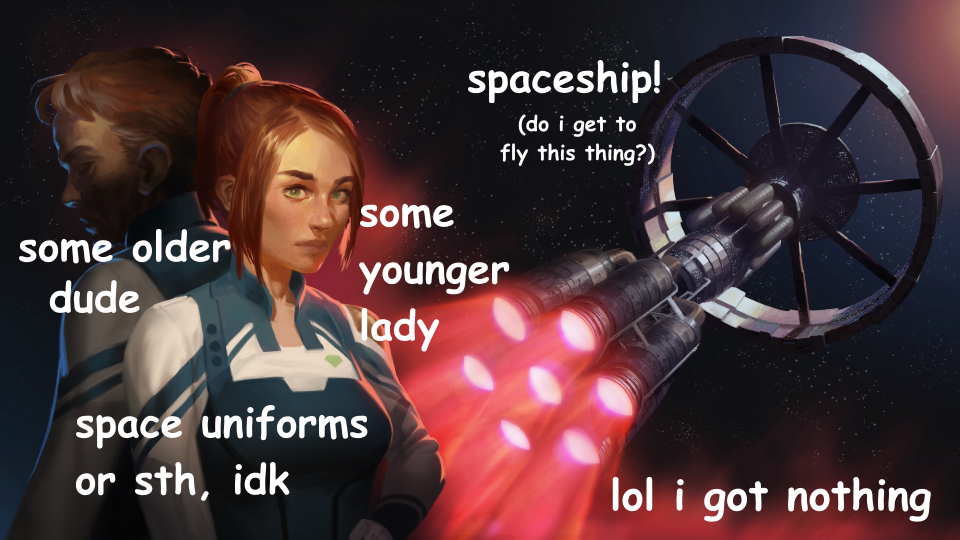
    Nothing about the title, the artwork, the art style, even the setting hints at the most important thing: the gameplay. This is why we decided to change the key artwork to something more mysterious and add the subtitle “A Sci-Fi Detective Adventure” over a year after release. We bundled it with a mid-sized update to the game addressing countless small issues that players had reported, and it was very well-received by the community. Unfortunately, it’s incredibly hard to catch a second wind once the Steam algorithm has made up its mind about your game. At least it’s not completely dead in the water, steadily gaining about 5 reviews every week. The impact of the rebrand is impossible for me to determine, but I like to think it helps prop up the long tail at least a little.

    The marketing

    So we agree that a terrible game can’t sell like gangbusters, but the more interesting question is: Can an amazing game sell terribly? I would certainly sleep better at night knowing that we made a perfect product, and our publisher simply failed to market it.

    Nothing works anymore

    While I do think the marketing for our game was stingy and lackluster, this seems to be the norm nowadays across publishers, studios, and PR agencies. Even the better efforts are constantly failing, especially lately. I recently had a chat with a friend whose latest indie production failed to gain traction and sold miserably on release. This is despite the game looking polished as hell, being a few million euros heavy, and the studio having thrown thousands of euros per month (!) at an established PR agency. Their coveted advice included industry secrets such as “maybe make another Instagram post” or “try sending out a newsletter”. When nothing seemed to work and wishlists remained far south of 10.000, my friend confronted the PR agency, who admitted that none of their current campaigns were working at all. This was a few months ago, just one of countless recent indie releases with high production value that completely and utterly bombed.

    For You can work against you

    So why is it so hard nowadays to build an audience to sell your game to? Before we turn to the overcrowded market and the post-COVID bust, I would like to point the finger at social media platforms. They used to be places where you could get the word out to your followers. Unfortunately, followers mean next to nothing nowadays. Chances are that they will never see your content again after they hit that follow button. After TikTok’s success with the For You page, other platforms followed suit, serving up endless content from strangers across the globe that is algorithmically optimized to keep you on their platform for as long as possible.

    For example, my girlfriend has over 270.000 TikTok followers. Her least successful videos sit at just 25.000 views (meaning less than 10% of her followers ever got to see them), while the most viewed one has 11.5 million (meaning her followers contributed at most around 2% to its success). You could say that this is great – you may not be able to cultivate fans as easily, but your content has an easier time than ever before reaching new people. While this is true, conversions to wishlists or sales from this type of feed are abysmal in my experience. Very few people will interrupt their scrolling session of infinite dopamine to hop on Steam. If you somehow get them to, algorithms might be quick to punish you and stop serving up your content because they notice that it drives people away from their platform. Some may bookmark the video, but most of them are merely building a separate “to-be-wishlisted” pile of shame on TikTok next to the “to-be-played” one on Steam.

    All that being said, For You pages can give your game a considerable boost if you manage to have a viral moment. If the view count is massive enough, even a tiny conversion rate can make major difference. Some developers have been building their games around their viral potential, with the “friend slop” category leading the charge lately. People love watching highlights from these games because they are extremely easy to understand and digest in the span of a few seconds. (And streamers love playing them in large part because they are hoping for a viral moment of their own.) Unfortunately, Between Horizons is almost the opposite of all that. There are no explosions, silly ragdoll moments, proximity chat, or funny voice filters. It doesn’t have a very clear formula and coherent premise that is quick to get across. On top of that, it’s a wordy, slow-paced singleplayer game where the fun lies in uncovering and understanding a complex story. It builds a relationship with players much in the same way a book does: in a long, quiet session on the couch or at the desk in the privacy of their home. Creating short-form content around it is possible, but very difficult.

    Luckily, there is always the route of (perceived) authenticity and relatability that’s doing quite well in this era of parasocial relationships. If your game isn’t exactly a For You page content machine, you can put yourself and the people from your studio in the spotlight. This is not for everyone, and – to me – often comes across as pandering and fake. Some devs go as far as completely making up their own human-interest story. It genuinely pisses me off to see posts hit the front page of Reddit claiming “I quit my job to make this passion project all on my own” when I know the game to be the fifth project of an established 12-person studio. And no, I am not jealous, as we can all play at that game if we want to – I simply dislike lying and liars, and I’ve always wanted Between Horizons to stand on its own rather than generating interest through clickbaity sob stories.

    On a side note, games like ours also do horribly at live events due to their slow burn approach. Almost nobody takes an hour out of their gamescom schedule to immerse themselves into a story while their friends are waiting to move on, and the neighboring booth blasts loud music in their right ear. At best, people might take a business card and check it out online once they get home. Be very hesitant to drop money on physical events if you’re making games like ours, and consider how much more (and better-suited) coverage it could get you online. Events can worth be your while if you can also score some in-person business meetings and/or if they give you access to a featured Steam sale. If you do end up at an event, and your game does poorly (or very well), the only thing you can safely take away from that is that it’s a very bad (or very good) game for live events. In my experience, this is not at all reflective of its long-term performance on the storefronts.

    The industry

    It’s convenient to blame the state of the industry, and there is some truth to it. Luckily, in 2021, publishers were still much more willing to sign investment deals, and the German state funding program hadn’t run out of money yet. We managed to secure both for Between Horizons right as these doors started closing slowly.

    That being said, the game’s release in 2024 still fell victim to the ensuing bust in multiple ways. In case you’re not aware, the COVID pandemic lead to a growth boom in the industry, as people were stuck at home playing games. Lacuna came out in May of 2021, and there is no doubt in my mind that the pandemic was a major contributor to its success. Throughout the pandemic, publishers and investors were riding the wave and throwing money around to fund a plethora of new projects. Fast forward a few years – the lockdowns are over, people are touching grass again, and the immense volume of games funded during the boom begins flooding the market. One of them is Between Horizons. There is of course no way to peek into an alternate reality where the games traded release windows, but it’s conceivable that our 2021 release would have always outperformed our 2024 release.

    When you are in an industry, you are always at the mercy of major forces (politics, economics, trends etc.) outside your control. You can do virtually everything right and still lose. This has always been true, but the past few years have made it painfully clear as most (!) of our friends’ studios threw in the towel. These were established companies with multiple successful titles on the market who continued to produce highly polished games with considerable budgets until the very end. In Germany alone, Mimimi Games, Studio Fizbin, Maschinen-Mensch, gentlymad, and countless others – some of which just haven’t publicized it yet – called it quits just over the past two years. The fact that we’re still standing (without having been bought up) almost makes us an outlier.

    Go big or go small

    I laid out earlier how growing for its own sake was a mistake, and I want to take this thought one step further. Are you ready for my hot take? I believe that mid-sized indie teams are a dying breed.

    On one end of the spectrum, teams of 1-5 people on a shoestring budget don’t need much to be sustainable, and even a moderately successful title stands a decent chance of making its money back and then some. Little overhead and shorter development cycles keep things dynamic and efficient. On a small budget, more ideas can be attempted, and they can be bolder. In fact, a good chunk of breakout indie hits in recent memory were created by such teams.

    I sometimes believe that the term “niche” is misused by people who refer to a strange or unusual concept that they believe will only reach a few existing hardcore fans. However, there was no “shotgun Russian roulette” fandom waiting patiently for Buckshot Roulette to come out, and the massive audience the game ended up reaching cannot be reasonable described as a niche. Yet, the game is deeply weird and extremely focussed around the “niche” thing that it does. The same goes for Blue Prince, Balatro, Mouthwashing, and many other breakout hits that simply dared to do something that, in my opinion, is only possible with a smaller, determined team on a modest budget. On the other end of the spectrum, there are AA teams upwards of 30 people that can produce polished projects with a wide market appeal and the ability to ship live service content, making the double-digit millions of investment (sometimes) worth it.

    This leaves the middle. Teams that are too big to follow the weird and bold “auteur” ideas, with budgets too high to justify such risks anyway. They often end up with relatively costly, design-by-committee titles that try to appeal to everyone while doing nothing in particular better than any other game. Too boring to stand out, and too small and unpolished to reach a truly big audience, they stand no chance of ever making their bloated budgets back. Many of these mid-sized studios have been closing down or scaling down, and I believe that this trend is here to stay for a long time. To relate this back to Between Horizons, I’m trying to say it might not have been too “niche” – but in fact not “niche” enough.

    Part 5: Acceptance

    If you’ve made it through all this yapping, you deserve a summary of key takeaways. If you scrolled straight down here: Hi, hello, how does it feel to be a dirty cheater? I’m just kidding, I forgive you.

    I’ve grouped these by topic rather than following the train of thought above:

    Which game to make (next)

    • If you’ve made a successful game and want to stay in its niche, iterate carefully and with purpose. Try new ideas with players as early as possible, especially ones that require expanding the scope and upping the budget.
    • Making a sequel is risky because people might, at best, just buy the first game more and never get around to the second.
    • From the inception to the execution of your game idea, keep marketability (and maybe viral potential) in mind. Genre, art style, characters, game title, and gameplay need to be a coherent package that immediately communicates the experience in unison.
    • Consider mocking up many game ideas quickly and cheaply, get them in front of an audience, and see what sticks.

    Production and company pitfalls

    These are the most personal and subjective takeaways, specifically for allrounders who could do most or all of it by themselves:

    • Be careful about growing your studio. You might burden yourself with overhead, lose ownership and creative control, and bloat the budget just so less experienced people get to do the fun part.
    • Give up control of technical aspects at your own peril. Depending on someone with a normal, non-24/7 schedule to constantly fix things for you will slow you down – and once they are gone, good luck creating updates for the game.
    • Never create systems, tools, or assets purely based on the assumption that you might need them later.
    • The player experience is key, clean code is not. If a quick and hacky solution does the thing you need, it is the best solution. More elaborate systems don’t necessarily break less often, but might take longer to get back into when they do.

    Market(ing) perils

    • Conventional knowledge doesn’t seem to work anymore, and even big players seem to have no idea what they’re doing when it comes to marketing. Be very wary of giving money to a PR agency or shares to a publisher if they don’t have a stellar track record.
    • The For You page has made it impossible to cultivate a recurring audience. Many new people may see your posts, but conversions are horrible. Viral moments are more achievable than ever, but only certain games lend themselves to those. If your game doesn’t, try spotlighting your studio and being relatable.
    • Mid-sized indie studios shutting down left and right might be more than just the post-COVID bust. The future may belong to big productions on the one end, and small, efficient studios on the other, who operate with budgets low enough to allow for bold ideas that can still reach a surprisingly large audience.
    • You can do just about everything right and still fail due to circumstances outside of your control.

    A word of encouragement

    Most of what I’ve written here might sound horribly grim to you, and I feel the need to put some of it in perspective:

    First, this being a post-mortem, I’ve focussed heavily on our mistakes since those teach us the most valuable lessons. We also got a million things right before, during, and after the game’s development. I deeply appreciate and value every single person who worked on Between Horizons internally, externally, and at our publisher, even though I’ve mostly criticized them (and myself) here.

    Second, even though many studios have been closing down, and countless people have been laid off, many of them aren’t leaving the industry. Some might be starting something new and incredible right now. In the same period, the market has only continued to grow – and so has the absolute (not relative) number of new releases making good money on Steam. I’ve tried to lay out a few ways to come up with games that might do well, but I’m sure that there are 1000 more waiting to be discovered (by you!).

    And finally: We’re just making video games. We didn’t crash a plane or mess up a brain surgery. You live and you learn, or in this case I did the living and hope that both you and I learned something from it. Once we’ve salvaged the past for mistakes to avoid in the future, we can shift our attention forward and think about our next venture that might just turn out better in every way. If it doesn’t, rinse and repeat. After all, you only truly lose the game once you decide to stop playing.

    Julian
  • Lacuna Devlog: Game Design

    Lacuna Devlog: Game Design

    Welcome to our very first devlog! Let’s catch you up on the past five years of Lacuna’s development.

    Just kidding; Lacuna’s first prototype did exist back in 2015, but we’ll spare you most of the details of its long journey. Instead, we thought that we’d focus on its somewhat unique game design.

    Gameplay

    Since the game isn’t out yet, we want to start by telling you what it will generally be like. Let’s attempt a description without marketing lingo: Lacuna is a story-driven adventure game with platformer controls and investigation elements. Its four fundamental gameplay types are dialogs (with choices), moving around, examining objects, and solving puzzles. All of them are staples of the adventure genre, especially point & click games, but each one is a little different than you might expect:

    Dialogs in adventures often loop back to one central node where the player can select all the options they didn’t previously select. In Lacuna, each dialog can only be played a single time. Dialogs branch based on player decisions, which oftentimes lead to consequences later in the game – some big, some small.

    Movement in Lacuna can be described as “platformer controls without jumping”. Pointing and clicking tends to feel too strategic, somewhat removing the player from the action. We found a direct control scheme (using WASD or a controller) more modern and immersive. However, since the game is primarily aimed at people interested in experiencing the story and solving puzzles, Lacuna never demands quick reactions or precise hand-eye coordination.

    Examining is one of the basic actions of any P&C adventure. In Lacuna, the player uses Investigation Mode to investigate nearby objects that might be of interest. They are recognized and highlighted automatically because we don’t consider searching things a particularly interesting type of challenge. Having a defined array of available objects to toggle through also lends itself to controller-based input (more than being able to select any pixel on the screen hoping it will react in some way).

    Puzzles in adventures are often self-contained mini games testing the player’s dexterity or logical thinking. Alternatively, especially in P&C games, they involve handling and combining items. Both types have a tendency to not make sense in the game world and/or not tie into the story in a meaningful way. By contrast, all puzzles in Lacuna are mysteries directly arising from the story and dialogs. The player solves them via dialog choices, investigating evidence, and ultimately via a central mechanic dubbed Case Sheets (more on all those mechanics in our example down below).

     This is the game’s first Case Sheet, very short and to the point

    Game Design principles

    From the very start, we laid out some design principles we’ve been trying our best to follow ever since. Some of them have become somewhat apparent in the previous paragraphs (e.g. unique dialogs, story-focused puzzles), but there’s a few underlying, abstract ones worth highlighting.

    The first one is no takebacks: We wanted to make choices and their consequences front and center in the game’s design and story. We felt like manual saving and loading would take away from that, and we opted for an automatic save system instead that always overrides your previous save file (in that slot). Non-replayable dialogs as described above were another consequence of this design principle. Not being able to go back might be frustrating at times, so to somewhat make up for it, we created three save slots allowing for multiple concurrent playthroughs. Plus, the game only saves after each level (i.e. every few minutes), so if you immediately regret something or made a choice by accident, you can undo it by reloading the level right away.

    We also decided to give the player very limited feedback. As much as we like some of Telltale’s titles, we were never fans of “x will remember this”. It yanks you right out of the action by giving you explicit information that your avatar doesn’t have (and that seemed to mostly be a smokescreen anyway). Lacuna gives no hints of this sort and doesn’t disclose which decisions matter more than others, quietly adapting to the player’s behavior. That being said, the reasons for certain consequences need to be made clear later to mitigate frustration.

    There are some more principles related to writing, but they’re a topic for another day. Let’s skip ahead and get to the big one. It’s so big, in fact, we need to give it its own headline:

    No getting stuck

    This design principle has been making our lives so much harder (but our game better) ever since we came up with it.

    The thought process behind it was simple: In games with both a story and puzzles (e.g. most P&C games), story progress is almost always tied directly to puzzle progress. Until you solve the puzzle at hand, you don’t get to see the next part of the story. For some players, especially those most interested in the story, this can become a problem. If they’re stuck for too long, there’s a chance they’ll just drop out and never pick the game up again. Even if that doesn’t happen, hard puzzles always run the risk of messing up the story’s pacing and interrupting your immersion in the game – because you’re becoming frustrated or, even worse, because you decide to tab out and Google the solution. To avoid people getting stuck, we considered a number of solutions:

    Solution 1: Make the puzzles very easy?
    This isn’t our favorite since it somewhat defeats the purpose of puzzles. They’d still play a role as a change of pace now and then, but if puzzles aren’t a little hard, nobody will feel like a detective solving them. Some early puzzles in Lacuna are easy, but most aren’t.

    Solution 2: Provide hints?
    Hint systems can be found in many adventures featuring puzzles. Unfortunately, they often take the player out of the experience in one of three ways: In some cases, the hint is provided by extradiegetic UI (e.g. in the pause menu) and therefore seems to come out of nowhere in the game world. In other cases, the player character is the one giving the hint, disconnecting the player from their avatar’s perspective. The third option of NPCs providing hints is a little better; however, it is often hard to justify why an NPC would be able to point the player in the right direction without possessing the rest of the solution to the ongoing puzzle (and why they didn’t volunteer it in the first place). The two types of (sort-of) hint systems we went with in Lacuna are Highlight Mode, which displays optional outlines around objects and NPCs that hold new information, and redundant information, meaning that sometimes the player is given two ways of obtaining an important clue.

    “YOU ARE PLAYING A GAME RIGHT NOW”

    Solution 3: Decouple story progress from puzzle progress?
    Why not simply make a story-driven game throughout which the player can solve the occasional puzzle if they feel like it? Well, because it would require that puzzles be somewhat detached from the story. As a result, they run the risk of feeling meaningless since solving them is not rewarding and failing is not punishing. However, this can work quite well when combined with…

    Solution 4: Make branching content for different solutions?
    Instead of impeding the player’s progress, wrong or missing puzzle solutions could lead to a less desirable continuation and/or outcome of the story. Unfortunately, creating a new story branch for each and every wrong solution to a puzzle is hardly feasible. However, there are less extreme ways of realizing this. For instance, the game could account for the player’s overall puzzling performance at certain points in the game, e.g. trigger the “good” finale to an act if they got more than x% of the puzzles right, and the “bad” one if not. There could also be cascading consequences of sorts, e.g. solving one case correctly may give the player an edge in a later one. These approaches have similar downsides as optional puzzles do, but to a lesser degree; puzzle success no longer being required for progress makes them feel more detached from the story and removes immediate feedback. Regardless, we have found this to be the best solution, which is why we employ it quite a bit in Lacuna (while trying to avoid all the pitfalls). By the way, if all of this is becoming too abstract for you, bear with us! The second half of this post is all about a real example from the game.

    Detroit: Become Human offers an astonishing number of different outcomes depending on player action, but not everybody has that kind of money to burn

    Despite all of these measures being taken to make sure that the player won’t get stuck, Lacuna can still be called a hard game. While it’s not difficult to get to the end, it’s pretty difficult to get a good ending and not mess things up on your way there. In other words, rushing through the whole story is possible if you don’t mind bringing it to a terrible conclusion.

    Detective game problems

    Many of the problems we encountered when designing Lacuna are as old as detective games themselves. Most of them are centered around how the player and the game communicate with one another, and especially how the player conveys their thoughts to the game. Several principles have proven to make for a good experience (across countless approaches to this problem over the years), some of which have made their way into Lacuna:

    Principle 1: Many channels out, few channels back in.
    If the game conveys information to the player on many different channels and in many different ways, the process of piecing the solution together tends to feel more interesting and rewarding. In Lacuna, the player picks up clues from dialogs, objects, environments, the news, and e-mails (with all sorts of attachments). At the same time, the channels via which the player communicates that solution back to the game are kept to a minimum, namely Case Sheets and (to a lesser degree) dialog choices. Having one or two central mechanics for player input makes the experience more coherent and transparent and facilitates designing the mysteries around it.

    Return of the Obra Dinn by Lucas Pope provides a bunch of different sources of information, but just one central mechanic for the player to communicate back to the game

    Principle 2: Have the player communicate only the solution.
    It is near impossible to create a system through which the player communicates to the game how they arrived at a solution. Luckily, this is not necessary. A well-designed puzzle provides all the information, then moves the entire solution process solely into the player’s head, and finally prompts the player to input only their answer. The player’s objective should be stated clearly, but in a very general way at the start of a case (e.g. “find the culprit”).

    Principle 3: Give the player maximum freedom in communicating the solution.
    The way in which the player communicates the answer to the game is the most crucial part to get right. One aspect is to give the player many choices (or a large combination of choices) to pick from. Two things should be avoided: 1. Giving the player a high probability to succeed by picking a random answer. 2. Making it easy for the player to guess correctly because only one or a few of the available answers appear plausible. An example for a bad solution like this would be to give the player three dialog choices to solve the puzzle; even worse would be if one of them obviously made the most sense. A better approach would be to give the player a cloze text (which is what Case Sheets boil down to) with a bunch of plausible options for each gap. Another possibility is to have the solution be an unguessable string of characters that the player needs to enter manually. Both ideas utilize combinatorial explosion to make guessing and brute-forcing nearly impossible, and both of them can be found in Lacuna.

    Good luck brute-forcing your way through Detective Grimoire’s cloze texts

    Puzzle example

    This has been a lot to take in, but hopefullly it’ll all become crystal clear when put to concrete use! The following is a level the player encounters early on in Lacuna. It won’t reveal much of importance about the story, but it will spoil the solution to this one puzzle, so consider yourself warned.

    Since this is essentially the game’s first puzzle, it won’t contain some of the difficulties added later (like a large number of channels communicating potential evidence). In harder cases, the player will need to have paid attention to testimonies, news articles etc. from earlier levels to arrive at the correct conclusion, and some cases span multiple levels. Not this one, though; all the information required to solve it is directly contained in the clues and dialogs of the one level where it starts and ends.

    The puzzle

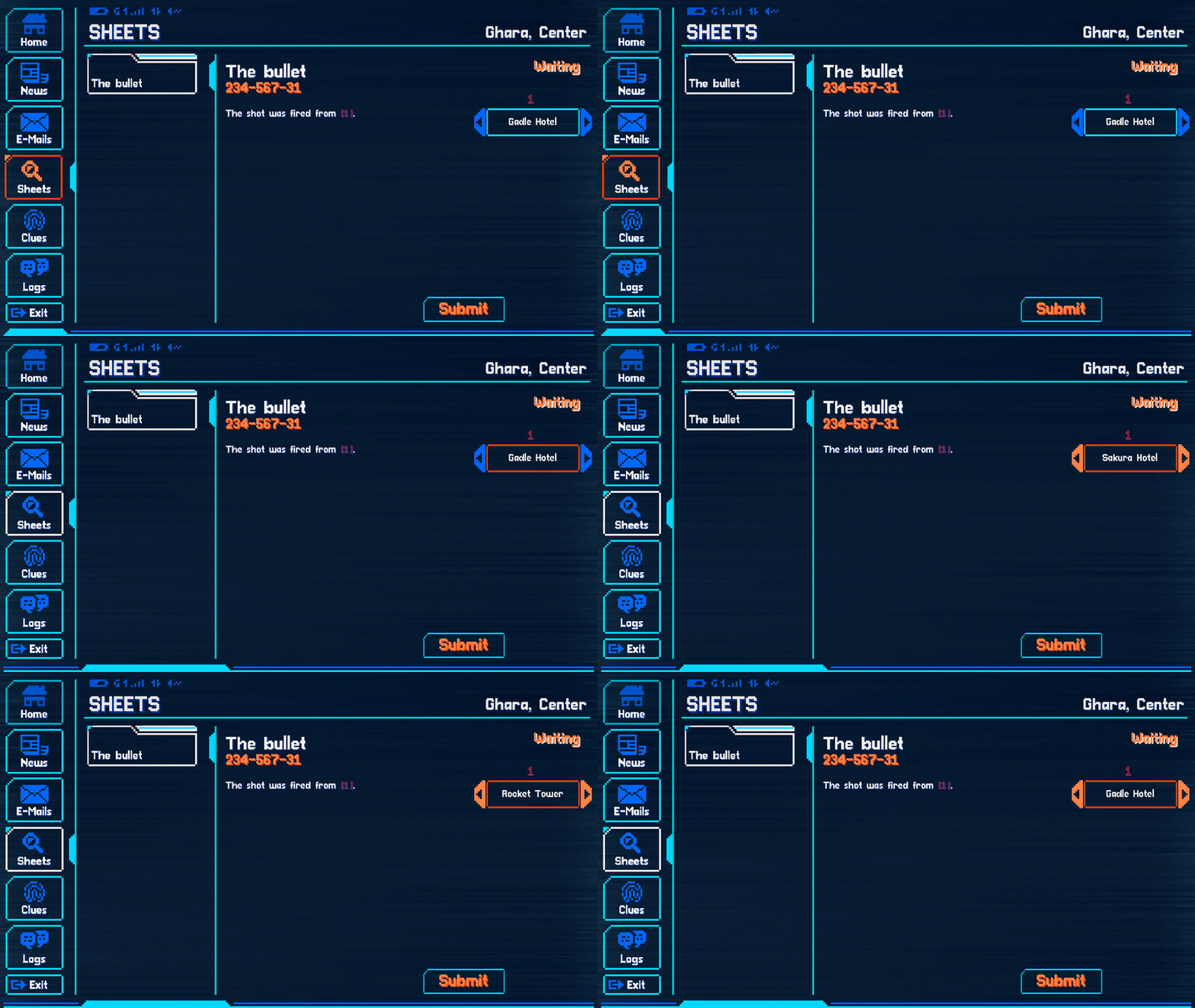
    Here’s what happens: Our protagonist Neil is called to a crime scene to investigate a murder. His colleague Gary explains that a sniper must’ve taken the fatal shot from one of the opposite highrisers. He mentions that one of them, the casino, is holding a large event with lots of security, so it probably wouldn’t have been the sniper’s first choice. Neil is also told that the bullet hasn’t been found yet.

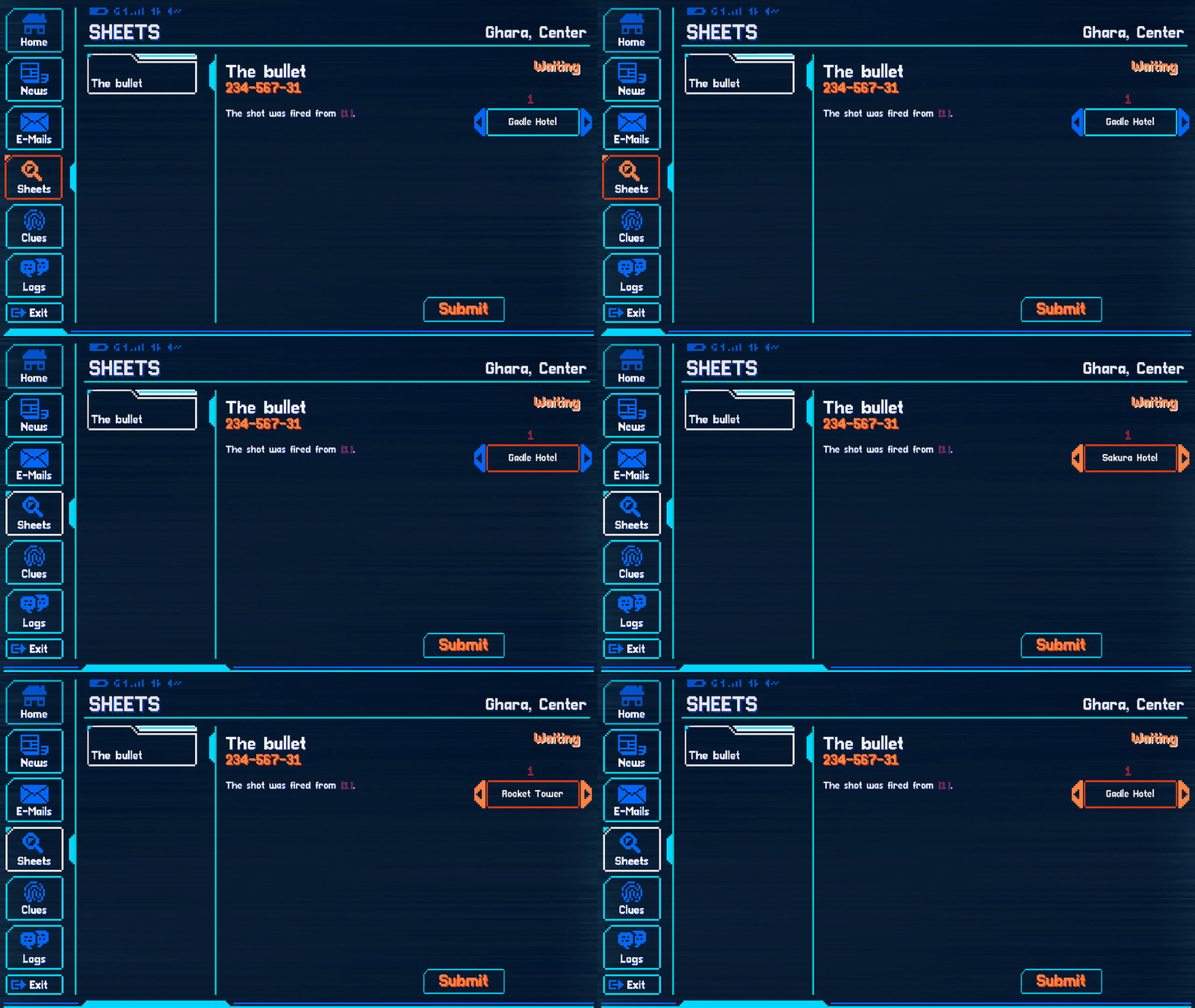
    At this point the player is given the Case Sheet, allowing them to submit their solution at any time from now on. This way, the player cannot know when exactly they possess enough information to solve it correctly. It also allows them to just submit any random solution if they completely get stuck and want to get on with the story. The Case Sheet simply reads “The shot was fired from ____”, which doesn’t spoil the solution while also formulating the question very clearly. There are only four options to pick from, which does make the answer more guessable, but we decided that was acceptable for the first puzzle, especially given that the player has only one shot.

    Puzzles

    The player can now walk around the building freely, investigate objects and talk to witnesses. Some of what they learn may be fluff, world-building, or even red herrings, but some is important evidence. The body lies out on the balcony, from where four buildings are visible: Gadle Hotel, Pixie Casino, Sakura Hotel, and Rocket Tower (from left to right). By investigating them, the player learns their approximate distance to the balcony. The position of the body, head to the left, already indicates that the shot probably came from somewhere on the right. A witness inside who saw the body hit the ground corroborates this.

    The player may notice that they can also investigate a cupboard next to the balcony door. Its description states that the bullet disappeared into the wall on the other side and that it is locked. Investigating it unlocks a new dialog with a witness who gives the player the keys. They open up the cupboard and find the bullet. Neil’s colleague takes a look at it and surmises that it came from a rather small and quiet rifle that cannot shoot accurately over distances greater than 200 meters.

    The player asks for the key in the newly available dialog

    Gadle Hotel probably appears unlikely at this point because it’s too far on the left. The casino is also on the left and would additionally be a bad pick due to its increased security that night. This leaves Sakura Hotel and Rocket Tower, only the former of which is close enough to be plausible. (Remember that the player learned both the rifle’s effective range and each of the buildings’ distances to the balcony earlier.) At this point, the player may decide they’ve seen enough and submit the Case Sheet.

    Processing the answer

    Now the game evaluates if the player got the answer right. If so, that’s perfect: The player’s correct answer causes the story to continue, and they head off to Sakura Hotel to look for the sniper. But how do we handle it if they picked one of the other three buildings?

    You might be thinking that we could prevent the Case Sheet from being accepted until it’s correct. Although not unheard of, that’s a bad idea because:

    • It allows brute-forcing. And if it didn’t (by introducing combinatorial explosion), it would allow getting stuck.
    • It doesn’t make sense that the Case Sheet or the person reviewing it knows the right answer and is withholding it.

    Then how about we trigger a game over state if the submission was wrong? Having to replay the level would at least discourage brute-forcing. The thing is:

    • We’re trying to avoid game over states since they break the immersion (in any game).
    • It’s frustrating chicanery; remember that we want people to be able to get on with the story whenever they want.
    • It contradicts “no takebacks”. You submitted the wrong answer, you should have to live with it.

    Okay, next idea. We could make all the incorrect buildings levels of their own and have the player go there to eventually realize they’re in a dead end… But we shouldn’t, for a number of reasons:

    • It destroys the story’s pacing.
    • It’s a lot of extra work most players will never get to see.
    • The player may take a long time to realize they’re in the wrong place and will then have to be steered in the right direction anyway.
    • It can’t possibly be applied to later cases, where Case Sheets allow for 256 (4x4x4x4) or even more possible answers.

    As is the nature of game design, what we did end up doing is the least bad solution with the most acceptable drawbacks. Here’s what happens: If the player picked the wrong building, everything seems fine until they get into a train to their destination. They then get a call about an anonymous tip made by someone at Sakura Hotel and are told to go there instead. This tip (and especially the reason for it being anonymous) is itself a piece of evidence for the puzzle at the hotel, already setting up the next mystery. This hopefully somewhat turns the attention away from the fact that the player just got railroaded back to the correct path. The player is also told that someone else from their squad will follow up on the building they (incorrectly) selected, and they will later learn that it turned out to be a dead end. Plus, Gary will make a snarky comment about the player’s misstep in the next level. These are some small ways to make the player feel like their decision wasn’t completely irrelevant.

    And in fact, it wasn’t: Here’s where cascading consequences come in. Each and every correct puzzle solution throughout the first act may produce a piece of evidence relevant to the act’s overarching case. This means that every incorrectly solved case makes it more likely (or even inevitable) that the player will fail the bigger ongoing case. Failing the first act’s overarching case will in turn lead to information not being obtainable in the second act, which in turn prevents the player from getting one of the two “best” endings to the game. This cascading system makes sure that even small failures can have big consequences even though the player is immediately railroaded into the correct path at the time of their misstep.

    Of course, this wouldn’t be game design we’re talking about if these cascading consequences didn’t come with their own set of problems. Most notably, the player may find it unfair or, even worse, not realize at all that they cannot know the solution to a later puzzle due to having failed an earlier one. But although we have come up with some solutions for this problem as well, let’s not go down that rabbit hole today.

    Have a look at this censored overview of just the second act: bubbles are scenes, and the thinner lines between them represent only the most important (cascading) consequences

    Did we stay true to our design?

    Let’s quickly go over all the solutions and principles mentioned in the first half and see if we managed to apply them to our case.

    Lacuna’s design principles

    No takebacks? Check. The player has one shot at submitting the Case Sheet and will have to live with the consequences.
    Limited feedback? Check. The player isn’t told (right away) if their answer was right or wrong, even though they’re always sent to the right building.
    What about no getting stuck, did we apply any of the provided solutions?
    Did we make the puzzle easy? Yes, but only because it’s an early one.
    Did we decouple story and puzzle progress? Yes, the player can always submit their Case Sheet, which ends the level and starts the next one.
    Did we make branching content for different solutions? Yes, in two ways: small changes in dialogs and, more importantly, our system of cascasing consequences.
    Did we provide hints? Sort of. We did the two things described above: use Highlight Mode and redundant information. Let’s briefly talk about how exactly:

    Highlight Mode, which enables colored outlines on evidence and people holding new information, is explicitly introduced at the start of this level. It helps the player notice a number of important things: that they can investigate the cupboard; that a new dialog becomes available once they start looking for the key; and after that dialog (in which the player obtains the key), that the cupboard holds new information because it can now be opened. Highlight Mode also acts as an indirect way of telling the player that they can solve the puzzle and stop looking for clues at a certain point, as there are no colored highlights left on any of the people or objects. Of course, Highlight Mode is optional, so players who like a challenge can just leave it off.

    There are also some redundant pieces of information. For instance, the player might already have the idea that the sniper was somewhere on the right based on just looking at Banny’s body. However, the dialog with the secretary confirms this again. Similarly, the player might think that Pixie Casino is far enough on the right to still be a possibility, but Gary telling them about the increased security there should make it clear that it’s not the right answer.

    Detective game problems

    Now for the detective game problems and their solutions discussed above.

    Did the game communicate on many channels? Not particularly since this is an early, easy case. The player only has investigatable clues and witness testimonies to work with.
    Did the player communicate back on few channels? Yes, the solution to the case is submitted via one central mechanic, a Case Sheet.
    Did the player communicate only the solution? Yes, the Case Sheet does not ask how they arrived at the conclusion.
    Did the player have big freedom communicating the solution? Not really, but we found it acceptable here as there’s still only a 25% chance of guessing it. A high number of solutions is much more crucial for games that allow infinite retries and thus lend themselves to brute-forcing (instead of giving the player just a single shot like Lacuna does).

    Final thoughts

    Detective gameplay is hard to get right and it’s naturally at odds with a game’s story in a number of ways. We’re lucky to be building upon so many experiments by countless other game developers teaching us what works (and what doesn’t), and it’s our hope that we’ve mixed an interesting and unique cocktail of ideas that will keep you engaged and entertained throughout our game. If you want to see for yourself, wishlist Lacuna now and give it a spin when it comes out.

    If you have any thoughts on the topic or resources to share, let us know! We’re happy about any opportunity to nerd out about game design.

    Julian

  • Future-Proof 2D Render Order

    Future-Proof 2D Render Order

    Once you start working on a 2D game, the question of how to set up a proper render order will come up very early on. Render order, at least in the way I will be using the term, determines which parts of your 2D game get rendered (drawn, displayed, shown) in front of (i.e. later than) other parts.

    Unfortunately, you won’t be able to figure out the requirements for a good system until after you need it. I just spent almost a week changing ours from what I thought would be good when we started our current project to what many months later turned out to make a lot more sense. Here’s hoping that our findings will save you the trouble of going through that painful refactoring process and help you get it right from the start.

    Please note:

    1. Some of this makes sense for any 2D game, but some will be specific to a perfect side view typical for side-scrolling games.
    2. This system accounts for real-time lighting; if that’s no concern of yours, a simpler system might do.
    3. It also accounts for multiple vertical layers, some of which are only revealed after a foreground sprite fades out. If your game doesn’t have this, parts of our system will be irrelevant for you.
    4. I will be using some Unity-specific terminology like “Sorting Layer” and “Order in Layer”. Nevertheless, most of this article should be helpful on a conceptual level regardless of game engine.

    1. Quick introduction: Render Order Terminology (in Unity)

    In case you’re working in Unity and are completely new to the topic, I thought I’d provide a short explanation of Unity’s Render Order system (as of Unity 2019.3.13) and give you a quick intro into its usage. If you already know it, skip right ahead to Best Practices below.

    The following assumes that you actually work in a 2-dimensional space and aren’t using the Z axis to determine Render Order. If you want your sprites to use Unity’s 2D Render Order system instead of rendering based on your sprites’ Z positions, you need to select your camera and set its Projection to Orthographic instead of Perspective.

    1.1 Sorting Layers

    Once that is done, all your sprites will be rendered based on Sorting Layers (“SL” for short). These work essentially like layers in Photoshop or any other image editing software: All sprites on one SL will always be rendered in front of all sprites on another, thus adding depth on an “imagined Z axis”.

    Let’s have a look at the available Sorting Layers. Add a SpriteRenderer component to a game object and select the Sorting Layer drop-down.

    Hit Add Sorting Layer… at the bottom to open the Tags and Layers window. It shows all existing SLs and allows you to add any number of new ones. “Default” cannot be deleted, but you don’t have to use it. The SL at the top of the list is rendered at the very back, the SL at the bottom is all the way in the front.

    Most of the advice under Best Practices pertains to which layers you should set up, so I won’t go into detail about it here. However, here’s a Unity-specific tip: When adding new SLs, use a slash to nest them. Nested layers will then appear neatly grouped together in the SL drop-down on your Sprite Renderers. In the example below, we distinguish between middleground (MG) and background (BG), each of which encompass several SLs:

    Once your SLs are set up, you can assign any sprite in your scene to them by selecting its SpriteRenderer component and picking the desired SL from the drop-down menu.

    1.2 Order in Layer

    Within each SL, sprites are again organized into an Order in Layer (“OiL” for short). While SLs have names, the OiL of a sprite is indicated as an integer. The higher it is, the further in front a sprite is rendered. Consider the following example containing three SLs: “Background”, “Middleground”, and “Foreground”.

    SpriteSorting LayerOrder in Layer
    SkyBackground-1
    MoonBackground0
    SkylineBackground1
    HouseMiddleground-1
    Player characterMiddleground0
    ColumnMiddleground1
    LaundryForeground0

    Even though sky, moon, and skyline are all on the background layer, they are rendered in the correct order because of their Order in Layer. As you can see, an OiL can have a negative int value.

    2. Best Practices

    At this point, you might think that you know all you need to render your sprites in the right order. If you’re going for a more simple look, that might be the case. However, if you want to go the extra mile (especially if you have dynamic lighting), here are some more specific tips for setting up Sorting Layers (SLs) and Orders in Layer (OiL) in a future-proof way. And even though the terminology comes from Unity, much of the following advice should apply to any engine on a conceptual level.

    2.1 Background and Foreground

    For our project, we have decided to distinguish between background (BG), middleground (MG), and foreground (FG). This is merely a conceptual distinction; on a technical level, each of these is made up of multiple Sorting Layers. We also added a Sorting Layer named “Dev” for sprites that we use for development only that’s invisible to the player. Something we didn’t do (but might in the future) is add another visible layer for all World Space UI to ensure that it renders in front of all non-UI sprites.

    Hiding and showing the three main groups of Sorting Layers (BG, MG, and FG) using a custom script

    No matter how you end up doing it, one thing to keep in mind when setting up SLs is lighting. Each 2D Light component in Unity can be set to affect or not affect any number of Sorting Layers:

    This means that the system determining render order and the system determining which lights affect which sprites are intertwined. This may cause problems; for example, let’s go back to the example shown under Sorting Order above: If you add a light to brighten the moon, it will inevitably (within its range) also brighten the sky and skyline because all three of them are on the same Sorting Layer. You might not want one light in the background to affect another background layer that seems very far away from it (on the imagined Z axis). Luckily, this can easily be resolved by making the system more granular, i.e. by adding more Sorting Layers. The moon and sky could remain on the same SL and the skyline could be put on a new one that’s visually closer to the player. This way, the moon would light up the clouds, but not the skyline.

    For our game, we created 7 Sorting Layers for the background alone. We ended up with that number specifically after experimenting and deciding that 7 visually distinct layers looked alright. You’ll notice that some background layers contain a big, semi-transparent sprite that adds atmospheric tint:

    Incidentally, we got another usage out of those 7 background layers by giving each one its own parallax speed. (Creating a parallax effect without the need for a Z axis is a topic for another day.)

    Some of those SLs may be further subdivided into Orders in Layer. For example, this street in the background is made up of three parts in itself: handrail in front, NPCs in the middle, and the rest in the back.

    We also added a “negative parallax” layer to the very foreground that moves in opposition to the camera and the parallax layers in the background:

    The middleground is where it gets complicated, so let’s give it a closer look!

    2.2 Middleground

    The middleground (at least in our terminology) is where all the action takes place, where the player and NPCs live, and as a result, where things move around a lot. I’ll first explain how we set it up and then elaborate on the reasoning behind it.

    2.2.1 Sorting Layers

    This next distinction might appear arbitrary at first, but it is in fact the ideal result we arrived at after a long series of experimentation: There are generally two types of Sorting Layers in the middleground; “movement layers” where the player and NPCs move around (called MG/middle and MG/back), and “wall layers” separating them (called MG/frontwallMG/middlewall, and MG/backwall). Think of this latter type as the “walls” sandwiching the middle and back SLs between each other (even though they contain many sprites not specifically depicting walls).

    The player and NPCs can only move on MG/middle and MG/back and sometimes switch from one to the other. Differently put, they can be in “middle areas” (where they are rendered on MG/Middle) and “back areas” (where they are rendered on MG/back). The distinction between these two isn’t always immediately apparent and may seem open for interpretation. When does the player transition from middle to back? The quick answer is: Whenever they “pass by” a layer of sprites (specifically MG/middlewall) that rendered behind them before and now renders in front of them, i.e. when they walk past a wall layer.

    By doing so, the player may enter the bounds of a sprite on the wall layer inbetween that then fades out. We call these “facades”, and one can be seen in the first example below.

    Moving up: Buildings and areas entered via frontal stairs from below are usually considered as the player entering a back area because the player walks “further into” the screen or “away from the player”, behind the wall layer they were previously in front of:

    However, this isn’t necessarily the case when moving up. In the example below, the player stays on MG/middle the whole time. That is because they never pass by a wall layer; the facade sprite that fades out was in front of them the whole time (on MG/frontwall), as you can see from the columns at the bottom:

    Other movements: Entering a building or area from the side or top is different as the player never goes “further into” the screen, thus never bypassing a wall layer, no matter if they walk normally, use stairs, or walk through a door. This case never counts as entering or leaving a back area because no movement on the imagined Z axis occurs.

    Teleporting: Teleporters moving the player from an open area into a room or building aren’t all the same. If the player is transported behind a sprite that was previously behind the player (again: if they move past MG/middlewall), they are indeed moving from MG_middle to MG_back:

    However, if the player does not move past a sprite that was previously behind them, they stay on the same layer. In the example below, the player teleports from MG_middle to MG_middle.

    2.2.1.1 What to look out for

    After telling you what worked, I also want to talk about the mistake we made with our Sorting Layers that caused me to rebuild the system completely to the way it is now. I urge you to read this bit as it might save you a lot of headache!

    The render order we used to have included only the Sorting Layers MG/front/middle/back/veryback. However, this fell apart with the introduction of 2D Lights: In certain scenarios, a sprite needed to be rendered on a certain layer but wasn’t supposed to be affected by a light source that applied to other sprites on that same layer. This mostly affected facades; consider the example below:

    Example setup; sprites have been moved on the Z axis only for demonstration purposes

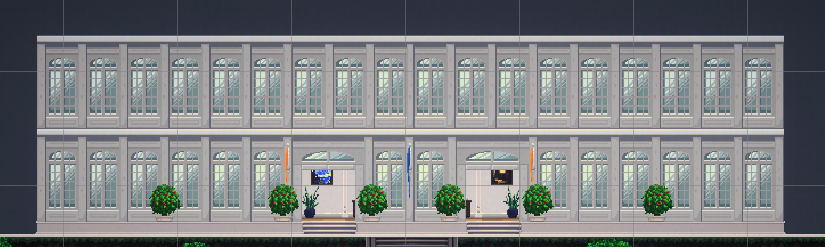
    The player needs to be rendered in front of the facade while outside the building. Therefore, since the player is on the (formerly) MG_middle layer, the facade needs to be on the same or a lower middleground layer to be rendered behind the player; it cannot be on MG/front.

    Example: outside (MG_middlewall)

    Example: inside (MG_backwall)

    However, light sources inside the building apply to (formerly) MG/middle as well as (formerly) MG/back to light up the correct sprites on the inside, behind the facade. As a result, lights rendered behind the facade appear to fall on the front of the facade, which shouldn’t be the case.

    That’s why the facade has to be on another layer between the player and the regular MG_middle layer, which is only affected by lights in front of it. To allow for this, we needed to add more layers.

    Unfortunately, simply adding more layers only half-solved the problem because sprites like the player and NPCs may switch from middle to back and vice versa. As a result, any light on one of those layers will either not affect those moving sprites or always affect them, including in the wrong scenarios (i.e. through walls). That is why we came up with the distinction between middle areas and back areas as well as the wall layers between them. Moving from one to the other changes the moving sprite’s Render Layer to MG/middle and MG/back respectively (simply based on entering trigger colliders). As a result, a light source affects them when they’re right next to it in the same room – but not when they’re right next to it but with a wall-inbetween.

    2.2.2 Order in Layer

    Similarly to the background, each Sorting Layer in the middleground is in itself divided into multiple Orders in Layer (OiL). Here’s what we learned about using those.

    2.2.2.1 Keep OiL the same across SLs

    The “wall layers” are each structured very similarly to one another, meaning that one wall layer’s OiL values are (almost) exactly the same as all the other wall layers’ OiL values. The two movement layers also share the same OiL values. This makes memorizing OiL much easier and considerably speeds up placing sprites in the scene. For example, one type of sprite (e.g. foliage) has the same OiL across all wall layers on which it occurs. Make sure to set up external documentation for these general OiL rules (and your Render Order in general)!

    2.2.2.2 Reserve OiL

    In our project, some of the sprites can be interacted with (we call these “Interactables”) and show outlines once the player gets in range. The outlines need to be rendered behind the Interactable, but in front of the sprite behind it. This means that one OiL between the Interactable and the sprite right behind it needs to be reserved for the outline to prevent “fighting” for render order between the outline and the background sprite. For instance, if an Interactable (e.g. a cigarette vending machine) is on OiL 1 and the sprite behind it (e.g. a wall) is on OiL 0, the outline of the Interactable would have nowhere to go in-between the two. That’s why we have now reserved certain OiL for certain renderers: The OiL of any sprite must always be set to a multiple of ten (i.e. end in 0); outlines always render 1 OiL behind the sprite they belong to (i.e. end in 9). In our example, the cigarette vending machine could be on 10, the wall behind it on 0, and the vending machine outline on 9. Particle effects also often overlap with multiple sprites in uncontrolled ways, so we always place them on an OiL ending in 8 to avoid “fights”. Layers ending in 2 to 7 are still free for future special usage if the need arises.

    2.2.2.3 Dynamic OiL

    Most moving sprites in our game, like characters, update their Order in Layer every frame depending on their y position. This has to happen in order for them to render in the correct order relative to one another (on the same SL) where movement on the Y axis occurs, e.g. on stairs. In the example below, the player character renders in front of the NPCs above it, but behind the NPCs below it.

    Simply binding the OiL to an object’s y position – the further up it is on the screen, the lower its OiL – might be enough depending on your setup. However, you’ll likely run into a couple of problems:

    Problem 1: This might not work for special situations, e.g. complex set piece animations with lots of moving parts.
    Solution: That is why we recommend adding a boolean so you can turn this functionality off if you ever desire to set the Order in Layer manually instead.

    Problem 2: What about the rule that sprites can only be rendered on OiL that end in 0?
    Solution: To ensure that this is the case for moving sprites as well, just multiply the OiL by 10. (Concrete formula below.)

    Problem 3: Calculating the render order of sprites based on their relative position only works for sprites that rest on the floor.
    Solution: If your sprites can jump, float, or fly, things get a bit trickier. The short answer is: take the distance between a sprite and the ground platform it relates to into account when calculating the sprite’s OiL. This wasn’t a problem for us because we have no jumping mechanics, so I won’t go into more detail about it. However, this great blog post does!

    Finally, here’s our complete OiL calculation formula (located in the Update() method) followed by a quick explanation:

    movingSprite.sortingOrder = -1 * (Mathf.RoundToInt(transform.position.y * 100f) * 10);

    ElementReasoning
    movingSprite.sortingOrderThe sprite’s Order in Layer value.
    -1Sprites higher up are actually further in the back, i.e. the higher the y value, the lower we want the OiL to be.
    Mathf.RoundToInt()The OiL needs to be an integer. Use rounding rather than casting to int, which only chops off the decimals.
    transform.position.y * 100Take the sprite’s y position down to the second position after the decimal point before rounding. (bigger order of magnitude = more precise)
    * 10Make sure the sprite’s OiL always ends in 0 as established above.

    This is what it looks like in the game. Note that the OiL at the top changes as the player moves up and down.

    And that’s how we do it!

    I’ll talk more about properly setting up 2D assets, e.g. creating a parallax effect and how to handle pixel art, in future blog posts. If you found an error in this post or see room for improvement, I’ll be happy to update it. And if you found it useful, feel free to share it!

    Cheers,
    Julian

  • Challenges in Game Writing

    Challenges in Game Writing

    Compared to film and literature, games are still a fairly young medium. As we could see with films, it always takes some experimenting until new art forms find their very own means of expression. In games, this process is further complicated by the fact that, over the past few decades, technological innovations in hardware and software constantly renewed and changed the possibilities of game design.

    Since their inception, games have been looking for ways of telling thrilling, deep stories that can keep up with films, series or novels in terms of quality and that nevertheless make use of the most important medial specificity of games: their interactivity. Unfortunately, this great potential can also be a huge problem when it comes to writing interesting stories.

    In this blog article, I will outline some of the most important challenges and difficulties we have encountered so far when writing the story for our upcoming narrative game. I will get into some of the solutions we found in my upcoming posts, but I hope that today’s article will be helpful as well – it might point you to some aspects you could take a closer look at if you have the impression that your game’s story isn’t as exciting as it should be.

    Challenge 1: Dramaturgy

    One big challenge consists in designing a tight dramaturgy for your game. You want your audience to be glued to the screen, much like when they’re binge-watching a show. To keep the narrative pace up, films and novels usually work with loads of ellipses, meaning that they only show you the most interesting parts of the story and skip the rest.

    In the first Lord of the Rings movie for example, you don’t see the fellowship of the ring walk from Rivendell to Lothlórien for hours. Instead, you only get the scenes that are action-packed, relevant for character building, or otherwise important for the progression of the plot.

    Skipping less interesting parts isn’t as easy in games since the player often is in control of the protagonist. For example, let’s say our hero is in her apartment and finally decides to break up with her girlfriend. In a film, the next thing we would see is the protagonist standing at her partner’s porch. In a game, we have control over the hero, which at the very least means we need to make them walk over to their destination ourselves.

    To make such mundane things interesting, games often add challenges such as search for the coat, key and phone of our hero, and then navigating her through the city and finding a way across those building sites that block the road she usually takes. Unfortunately, this often tends to draw things out even more.

    Although it is important to give the player agency and different possibilities to go about something, interactive passages in narrative games can easily cause a drop in tension and give the audience a good opportunity to zone out. Telltale Games titles like The Wolf Among Us illustrate my point: They have a very tight dramaturgy and, in my opinion, are highly successful in creating tension. On the flipside, they have to reduce interactivity to a minimum in order to do so.

    Challenge 2: Character building

    In films, series and novels, the writers often put a lot of work into creatinginteresting, believable, and ambiguous characters. Public discussions around successful shows like Game of Thrones (up to a certain point) and Breaking Bad have demonstrated that audiences value these efforts. In games, we again face special challenges when it comes to character building.

    As mentioned above, the player is often in control of the protagonist. However, at the beginning of a game, you don’t know anything about your avatar, meaning that there is a big discrepancy in knowledge between you and the character you are supposed to identify with. Nevertheless, you often have some influence over the protagonist’s behavior and, in many games, may even have to make decisions for them. This can make you very aware of the divide between you and the protagonist and thus hinder identification and immersion.

    If you’re making a game that allows players to influence the course of the story, it can be very hard to create consistent, believable protagonists. Let’s say the player can decide how the protagonist behaves in certain situations. If the options between which the player can choose are very different from each other (e.g. they can either knock out a suspect or take a friendly approach), the choice is interesting and meaningful, but unless your protagonist suffers from multiple personality disorder, it’s hard to justify why both options represent plausible behavior.

    On the other hand, if the choices are basically one and the same (e.g. take a friendly approach or a very friendly approach), they are more consistent with your character’s personality, but they aren’t interesting for the player and won’t give them the impression that they really have an impact on the story.

    One more difficulty consists in finding appropriate ways to display your character’s personality. In novels, inner monologues and insights into the protagonist’s head allow the readers to learn how they think and feel. In visual media like films, authors mostly stick with the paradigm of “show, don’t tell”, meaning that they don’t tell us what the characters are like, but let them show their personality through their behavior.

    Games also belong to visual media, but depending on the art style, the range of what you can show is extremely limited. In films and series, the of the actors’ performances may draw a very nuanced picture of the characters. They are able to make use of body language, intonation, facial expressions, and gestures. In a game, you might not have the budget to use voice acting, and if you go with a low-res or abstract art style, integrating detailed facial expressions isn’t an option either.

    To sum it up, creating complex, nuanced, and consistent characters can be difficult due to the player’s influence and the limited means of expression.

    Challenge 3: Gameplay

    The third challenge concerns the potential interferences between gameplay and narrative. When you’re writing a story, you usually want to your audience to be completely immersed into the plot and, to a certain degree, forget about themselves and the real world they’re in. However, in an interactive medium, this absorption into fictional story worlds can be hard to achieve.

    This might sound counter-intuitive, but as soon as you have to actively do something and start to act, you necessarily become aware of yourself again. Of course it’s possible to completely immerse the player into the story world during interactive passages, but it is harder to achieve than in non-interactvie media. Please note that I’m only talking about immersion into the story. Immersion into the gameplay can of course be increased by interaction, but it often takes the focus away from the story.

    There’s a number of difficulties related to gameplay and interactivity. I will go into them in more detail in my upcoming posts, but I will highlight some that seem particularly important to me.

    First, in many games, it is possible for the player to fail: They can die in a fight, fall off a cliff or, as is the case in some older story-driven games, pick the wrong choice and thus cause the game to end. If you fail, you can usually retry from a nearby save point. However, the ability to try again makes failure narratively meaningless. You just do the part over and over again until you succeed; there aren’t any consequences whatsoever for the course of the story.

    As a consequence, when you have to pick your next choice for example, you’ll just try any one you haven’t tried before to see what brings you success, and it won’t be a tough decision for you. In addition, every time you see the “Game Over” screen, you’re reminded of the fact that you’re playing a game. In short, failure that temporarily ends the game often breaks immersion.

    Second, being stuck at a certain point can also have an extremely negative impact on your immersion. You might get annoyed because you can’t solve the puzzle. You might start doing random stuff hoping to find another clue. You might even tab out of the game and Google the solution. Whatever you do, you certainly don’t feel like you’re the protagonist facing a life-threatening situation anymore.

    Third, it can sometimes be hard to find a good balance between complexity and accessibility. Complex stories are often more interesting, realistic and subtle than those that follow a simpler formula. However, depending on your mechanics and your game design, it might be vital that the player have an idea of what is happening. In a detective game, they might even have to be able to reconstruct the course of events or to uncover hidden connections.

    This, in turn, can be difficult to achieve if you have a multi-layered story. If, for example, the player controls a detective and has to find out what happened at a crime scene, you have to make sure that there is only one plausible version of events. In reality, things usually are rarely that clear-cut, and the story is usually more authentic and credible if you try to mimic the complexity of real life to a certain degree.

    All in all, those are some of the most important challenges we have faced and still face working on our story-driven game. As promised, I will talk about some of the solutions we came up with in my upcoming posts. If you encountered different problems while working on your game’s story, tell me about them. And if you found my article useful, feel free to share!

    Cheers,
    Jasmin

  • Stairs in a 2D Side-Scroller

    Stairs in a 2D Side-Scroller

    Preface

    Movement on stairs has been the bane of my existence for a long time. I first added it to our old prototype in late 2017 and the code stayed more or less the same up until recently. It was barely good enough for our prototype, and it was never meant to stick around until release.

    However, precisely because it has produced so many bugs and highlighted so many pitfalls, I can now tell you what to look out for when designing your own system. I say “designing” because I will talk about game design a lot and address programming only conceptually rather than providing actual code snippets. Otherwise, this already lengthy write-up would definitely grow out of proportion.

    First, I want to quickly describe what the key features of our movement system are. If yours has completely different requirements, the solutions I am about to lay out may not work for you.

    1. The game is a 2D side scroller allowing the player to walk and sprint. It has no jumping or dashing, meaning that stairs can only be entered at the very top and bottom.
    2. Movement on stairs has its own custom animations rather than re-using the ones for regular horizontal walking (and sprinting).
    3. There are two types of stairs: frontal (vertical) and side (diagonal) stairs. The latter can descend (top left to bottom right) or ascend (bottom left to top right).
    4. All steps have the same size to fit the player’s animations. Stairs can be any length.
    5. Our player model’s collider (relevant to stairs movement) is around the thighs. However, this is not a requirement for most of this to work on a conceptual level.
    6. We don’t have any combat or other factors that might apply forces on the player while moving on stairs.
    7. The goal is to create intuitive, bug-resistant, and good-looking stairs movement.

    With all that out of the way, let’s iterate and solve problems as they pop up! We’ll start with side (i.e. diagonal) stairs; as you will see, most of the rules we’re about to set up apply to frontal (i.e. vertical) stairs as well.

    Part 1: Getting on the stairs

    The first thing we’re trying to do is get the player on the stairs. Let’s create the very basic iteration 1 of our stairs: When the player is about to pass by the stairs, they hit a collider (we’ll name “bypass check”) that switches them to stairs controls. Place another bypass check at the other end of the stairs and switch back to normal controls.

    The player collider is shown in green, the bypass check is blue.

    The first problem we’re going to solve might appear exotic at first, but it’s actually pretty important to think about early on: The player might not hit the collider at the right moment, especially at a low frame rate if your player movement speed is FPS-independent (which it definitely should be). With fewer frames per second, the walking distance between frames increases, and the higher it gets, the more the player will overshoot.

    At high FPS, the player will hit the collider just as they get in range:

    However, at low FPS, they they may hit the bypass check with just the back of their collider:

    This will cause the walk animation not to fit the stairs sprite. That is why, in iteration 2, we must pick one of two solutions for this:

    1. Simply teleport the player to the right position when starting (“entry point”) or ending (“exit point”) movement on stairs. Since the teleport distance is only bigger at low FPS, when the game is already choppy, the teleport won’t be noticeable.
    2. Have physics calculations happen between rendered frames. This will automatically solve this problem because the collision is always registered in the exact right moment. If you use Unity, FixedUpdate() will take care of this for you, which is called a fixed number of times per second regardless of visible FPS (by default 50 times, but you can change this value to your liking).

    Regardless of the solution you choose (the second one being preferable), I will keep using the terms “entry point” and “exit point” in the rest of this article, as those are conceptually revelant either way.

    The arrow illustrates a movement from one frame to the next.

    Now on to less obscure problems. What if the player wants to be able to walk past the stairs? So far, the player will always enter them once they touch one of its colliders.

    To solve this in iteration 3, let’s start by defining a different collider (called “entry range”) around the start of the stairs. Only when pressing up (at the bottom) or down (at the top) will the player start walking up or down the stairs. Moving left and right makes them walk past the entry points, and they continue with their regular horizontal movement.

    The problem now is that once the player starts pressing up or down inside the entry range, the player will start moving up exactly from where they are, not from the entry point. And even if they teleport to the entry point first (because we implemented that in iteration 2), the teleportation to the starting position looks way too obvious because the collider is so wide:

    To solve this in iteration 4, we make the character walk to the actual entry point while the player holds up or down inside the entry range. E.g. if the player is right of the entry point at the bottom of the stairs, holding up will cause the character to walk to the entry point first before they enter the stairs. For this to work, we need to add some conditional extra controls to our regular movement controls that only apply within entry range.

    Arrows in squares show which button the player is currently pressing.

    Now of course we got rid of the teleporting for good and, as a result, we’ve again lost control over where exactly the player enters the stairs, so the animation looks off. That is why, in iteration 5, we combine entry range and bypass check! However, the latter needs an upgrade now that the player can approach the stairs from both sides (as they can walk past them). The bypass check needs to dynamically switch to the opposite side of the stairs’ entry point, so the player is just in the right position when they hit it from either side.

    The combination ultimately works like this: If the player is within entry range and holds up/down, they move towards the entry point, and then when they hit the bypass check still holding down the button, they start moving on the stairs.

    Note: The bypass check always switches to the opposite side of the player so the two colliders touch at exactly the right time to initiate walking on stairs.

    Now the player can walk past the entry point of all our stairs. But what if the stairs are the only way to progress to the left or right? What if we sometimes want them the way they were in iteration 1, forcing the player to enter if they hold left or right towards the stairs? Depending on your level’s layout, some stairs may be the only way to progress in a direction while some others merely branch away from a path that continues on as well.

    That is way, in iteration 6, we distinguish between two types of stairs entry points (“bypassable” and “non-bypassable”). To that end, let’s add a boolean called “bypassable” that we can set individually for each end of each stairs object. If an entry point is not bypassable, the bypass check collider no longer dynamically switches sides because the entry point can only be approached from one side. Instead, the collider is always fixed to the opposite side of the approaching player.

    With this addition, we now have to make sure to account for every possible button or combination of buttons the player may use to express their intent to enter the different types of stairs entry points. Up (at the bottom) and down (at the top) already work on all stairs. However, when approaching non-bypassable stairs from the left, pressing right also expresses the intent to enter the stairs (and vice versa) because moving past them is not allowed. Now when hitting a bypass check, the player will be put on the stairs only if they are currently pressing one of the buttons specific to the current case.

    If the stairs in this example are bypassable, the player must hold up to enter them, or left/right to walk past them.

    The same goes on top of bypassable stairs: down to enter them, left/right to walk past

    If they are not bypassable, holding right and/or up will both be interpreted as the player intending to enter the stairs.

    The same goes on top of non-bypassable stairs. Pressing down and/or left will result in walking downstairs.

    This should feel nice already, but depending on the exact implementation of our controls, we may have just created a different set of problems by giving the player the ability of pressing so many different buttons near the stairs to walk towards them.

    To fix them in iteration 7, we need to define which buttons cancel each other out at the entry points of the different types of stairs and which ones must not add their movement speeds up with one another. We also need to set the animations accordingly, e.g. if two buttons cancel each other out (if the player is holding left and right, for example), the player model should not walk in place. To account for all the possible problems, it is important to distinguish between ascending stairs (bottom left to top right) and descending stairs (top left to bottom right). For instance, a player standing in the range of descending stairs might cause a “walk in place” animation by holding left (away from the stairs) and down (which, remember, counts as towards the stairs in this case). Or they might hold down (towards the stairs) and right (also towards the stairs) for twice the movement speed. We have to account for all different cases of all different button combinations on all types of stairs to make sure that doesn’t cause any problems. Maybe you have a clever system that does this for you already or you’re like me and you manually define a bunch of boolean combinations outside the actual movement logic.

    Holding left, holding down, and holding left + down should all yield the same result in this situation.

    Down + right and left + right both contradict each other. Holding these combinations causes the player to stop.

    I urge you not to be lazy about this step and to cover all your bases, both to prevent bugs and make the movement as intuitive as possible.

    Alright. Getting on side stairs works fine now. Are there special rules for frontal stairs?

    We actually only need to make a few small adjustments to add frontal stairs in iteration 8, as the basic logic works the same. In our game, we made it so only a pre-defined line on frontal stairs can actually be used rather than their whole surface. As a result, they have two clearly defined entry points, just like side stairs. This also means that the player can always walk past frontal stairs, i.e. both their top and bottom are bypassable, because the width of the stairs sprite is always wider than the entry range. In some cases, of course, the player may walk past frontal stairs and bump right into a wall which then stops them anyway. The rest (about getting on the stairs) works exactly the same. Even better, we don’t ever need to account for the player trying to get up frontal stairs by pressing left or right.

    Holding up within entry range causes the player to walk to the entry point and then start walking up the stairs.

    Holding down within entry range causes the player to walk to the entry point and then start walking down the stairs.

    Part 2: Walking on the stairs

    If you’ve made it this far, you seriously deserve a pat on the back. Entering stairs is the most complicated part of this system, I promise. Now let’s define movement on the different types of stairs.

    Depending on how your game is set up (e.g. if you use actual physics and gravity), going up diagonally or vertically might cause some problems, e.g. your player slides right down on their own once they enter stairs from the top. That is why, in iteration 9, we railroad the player along the stairs. Instead of physically resting on a collider, they move along an angled line with no physics involved. In fact, let’s cancel all forces on the player object when entering stairs and ignore any forces while on the stairs. In the case of our game, we luckily don’t need to account for combat or other factors that might apply forces to the player while they’re moving on stairs.

    But how can we ensure that the player always ends up at the top or bottom when moving up and down that angle? We could calculate the angle between top and bottom, but since our steps are always the same size to fit the animation, the angle of all our side stairs is automatically always the same regardless of length, and we can simply hard-code it.

    The angle is shown in blue. It’s not a collider, but exists merely in code.

    Alright, so how do our movement controls work on stairs? Let’s design them in iteration 10. The player expects both up, right, and up + right to walk them up ascending stairs (and the opposite for descending stairs). Make sure not to add up speeds.

    We also need to once again account for button combinations that cancel each other out. For example, on ascending stairs, left and down are the same, so both should cancel out up and right, which are also the same.

    What about controls on frontal stairs? Time for iteration 11!

    You might think that pressing up or down is all there is to it. However, forcing the player to hold up or down until they’re at the very end before they can go left or right feels counterintuitive and unpolished. It may also happen that the player is still 1 pixel beneath the top or above the bottom, wondering why pressing left or right doesn’t do anything. That is why we need to define the part of the stairs within 1 meter of each end as “exit range” of the top or bottom respectively. While the player is within exit range, pressing left or right will move them towards the exit point of the stairs. Then, once they reach the exit point, they leave the stairs and continue walking in the direction they’re holding down. Maybe you’ve already noticed that this works exactly like the entry range, which allows players to use additional buttons to walk towards the entry point (which we added all the way back in iterations 3 and 4). Again, we have to account for button combinations that should cancel each other out or would add up speeds.

    Exit range at the top and bottom of stairs shown in blue. You may use a collider for this, but we calculate it from the distance between player and nearest exit point.

    While the addition of an exit range adds a lot of polish, it also brings about its own set of problems that we’ll have to solve in iteration 12. For example, what if our frontal stairs are only 2m high or even smaller, putting the player within exit range of both top and bottom at the same time? Let’s set the exit range at, say, 20% of the stairs’ total length instead of hard-coding it to 1m each.

    Shorter stairs, shorter exit range

    This fixes our problem for short stairs, but it causes a new problem for long stairs, for which 20% is too big of an exit range. So in addition to the rules we set up in iteration 12, let’s also set a maximum exit range of 1m for each exit range in iteration 13.

    Part 3: Getting off the stairs

    We’re almost done! Now that getting on and moving along stairs works, getting off the stairs is actually fairly easy.

    Right now, our player just walks right past the top and bottom into infinity:

    In iteration 14, we set up colliders that allow the player to exit the stairs (i.e. go back to regular walking controls with physics re-applied) upon being triggered. We actually re-used the range colliders of top and bottom for this:

    The only problem with that is that the colliders are triggered too early, especially at the top, because of the player collider’s height. Let’s place the colliders at the top and bottom high and low enough respectively, so the player is inside them at the very end of their walk up or down the stairs.

    Alright, but: The player is still inside that collider while they’re still in the process of entering the stairs, so can’t they turn back around and walk right through it without triggering it again, allowing them to walk past the exit point? Why, yes! In iteration 15, we solve this the same way we did for entering the stairs: We define a number of buttons that expresses the intent to leave the stairs for each case (descending/ascending/frontal), same as in iteration 6. When the player presses one of those while inside the exit range, they leave the stairs again.

    In iteration 16, we again account for low FPS which may cause the player to overshoot the exit point. If you already use FPS-independent physics calculations as mentioned in iteration 2, that’s all you need. If not, let’s teleport the player to the exact exit point, the same way we teleported them to the entry point:

    And that’s it! In only 16 simple iterations, we’ve reached the goal of creating intuitive, bug-resistant, and good-looking stairs movement.

    Of course we realize that this type of movement system isn’t at all complicated or sophisticated compared to some AI-based 3D multi-terrain movement system a programming super brain might be able to cook up nowadays. However, it works well for us and should be reasonably easy to implement into any similar 2D side-scroller. In case you’re thinking that any aspects of it could be simplified, solidified, or anything-else-ified, feel free to let us know. We’ll gladly refine both our code and this guide to better help other developers in the future.

    We hope it helped or entertained you or, at the very least, showed that a seemingly innocuous mechanic can be pretty complicated to implement sometimes.

    Julian